Solo Project
A driving intelligence companion for every car.
Timeline: 3-day sprint
Tools: Lovable, React, Mapbox GL JS, Claude AI
Role: Product design, UX, prototype build
Interactive prototype (best experienced on full screen)
Most drivers have no idea how they actually drive. They find out their habits are risky when their premium goes up, when they have an accident, or never at all. Insurance companies, meanwhile, are making pricing decisions based on demographics and history rather than real behavior.
DriveSafe fills that gap as a mobile-first driving intelligence companion that works with any car, uses the sensors already in every smartphone, and creates a bridge between driver behavior and insurance outcomes.
Most driving technology is also designed primarily around the car. This project started from a different question: what does the driver actually experience in the moments before something goes wrong? Here, we also explore the process by which a mobile device can directly react and respond to the driver's transient state.
The usage-based insurance (UBI) market is one of the fastest-growing segments in insurtech. Programmes like Progressive's Snapshot and State Farm's Drive Safe & Save already show strong consumer appetite, but they require proprietary hardware dongles or are manufacturer-locked. A smartphone-native solution with open insurance data export removes both barriers instantly.
There's also a safety angle that sits above the insurance story entirely. Drowsy driving causes tens of thousands of accidents per year, and distraction is the leading cause of collisions in most markets. A product that monitors alertness passively and intervenes before an incident is a genuine public safety tool, not just a cost-saving one. That dual-value proposition of "save money, drive safer" is a strong hook for both consumers and potential insurance partners.

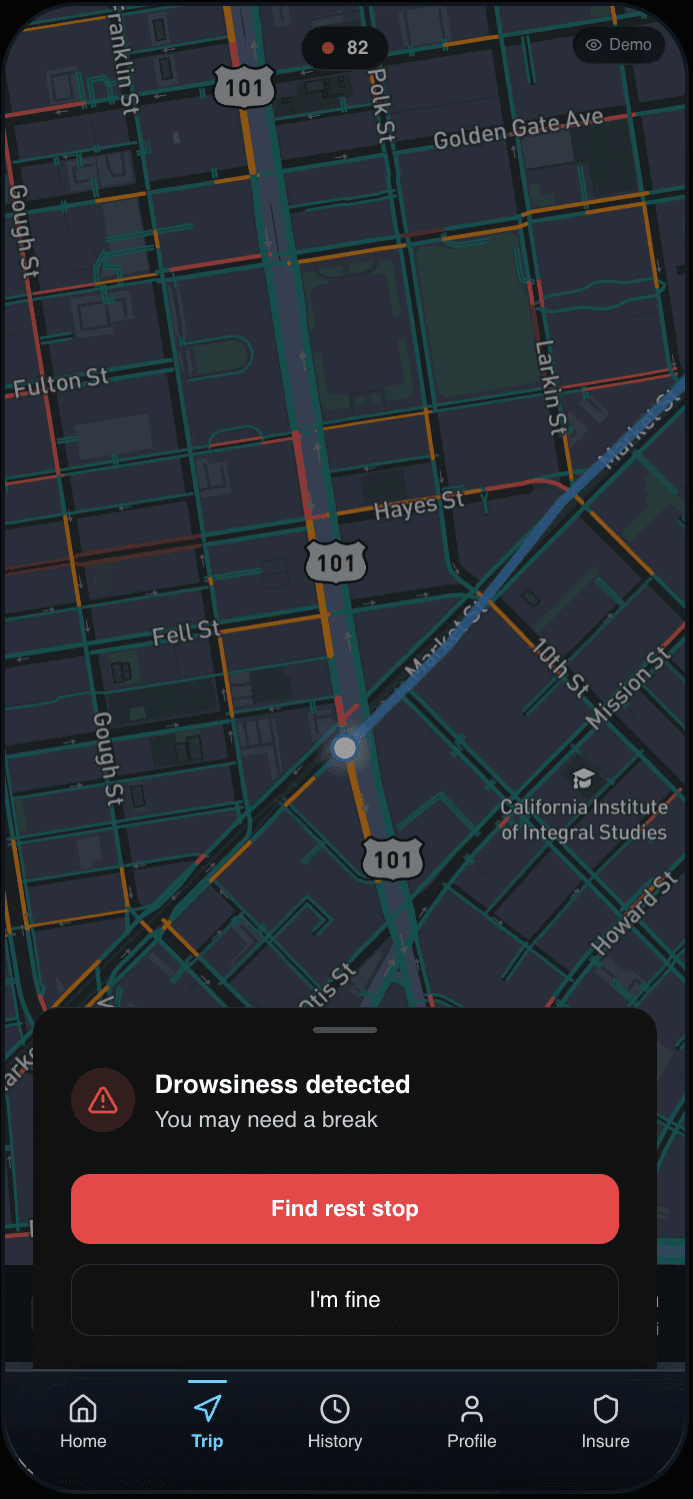
DriveSafe runs as a background service on your phone while you drive. It tracks:
Driving behavior
speed relative to limits, hard braking events, sharp cornering, and acceleration patterns, all derived from GPS and the phone's accelerometer.
Driver alertness
the front camera runs an on-device ML model tracking eye closure (PERCLOS), blink rate, gaze direction, and head pose to detect drowsiness. No video is ever transmitted or stored.
Trip data
mileage, route, duration, and time of day, packaged into a shareable insurance report.
At the end of each trip, a score is generated. Over time, a driver's profile builds into a dataset that insurers can use to adjust premiums rewarding safe, consistent drivers with lower costs.
In its ideal form, DriveSafe is an OS-level overlay that floats on top of Google Maps. The driver never switches apps with DriveSafe escalating to alerts only when something demands attention.
This is the product vision. It requires native OS permissions a web-based prototype can't replicate. What the prototype does instead is approximate that experience within its own screen using a real Mapbox map in Google Maps' night style, with a route line, navigation bar, and the DrivingOverlay states sitting on top exactly as they would in production. The context is authentic even if the implementation is self-contained. The OS-level integration is an engineering problem for a later stage.
The principle still holds that DriveSafe should be invisible until it needs to speak.
Entry to driving mode, notifications in demo mode (pills invisible in practice)
2 Modes:
a browsable dashboard for reviewing scores and trips, and
a driving mode entered by tapping an orb on the home screen. The explicit entry point intentionally puts the driver in control and doubles as the consent moment for monitoring to begin.
4 States:
Once in driving mode, the app earns attention in proportion to urgency.
Ambient state does nothing : the driver should forget it's running. Minor events are handled by audio and auto-dismiss without interaction. Drowsiness is the only state that earns a full interruption, with actions positioned where thumbs naturally rest and audio firing before the visual so the driver already knows why before looking. Trip summary is withheld until the car stops, showing a score while moving creates the distraction the product exists to prevent.
Tabs lock during driving and unlock when the trip ends. The app enforces its own distraction principles on itself.
Every smartphone sensor maps to something useful:
Front camera : PERCLOS eye tracking, gaze direction, phone-holding detection. All on-device via MediaPipe.
Accelerometer + gyroscope : hard braking, sharp cornering, road surface quality, phone pick-up detection.
GPS : speed vs posted limits, mileage, road type, automatic trip start/end.
Bluetooth : auto-start when paired to car, hands-free vs manual call detection.
Barometer + ambient light : weather and night driving context for condition-adjusted scoring.
Screen activity : unlock events while moving flagged as distraction signals.
Smartphone over OBD-II hardware a dongle adds friction, cost, and a hardware dependency. Sensors in the phone are sufficient and work on day one.
Explicit button entry over auto-detection a deliberate tap puts the driver in control and doubles as consent for data collection.
Audio-first alerts carry the full message allowing the visual as a fallback.
Bottom sheet for drowsiness Two large targets, safe to tap while holding the wheel.
Real Mapbox map over a static background communicates product context immediately.
OS overlay integration
Android's permission and iOS Live Activities are the path to running directly on top of Google Maps.
Eye-tracking calibration
False positives cause alert fatigue. The threshold needs rigorous device testing before launch.
Insurance partnerships
The business model only completes when insurers act on the data.
Privacy architecture
Location, behavior, and biometric data require a consent and retention framework before any production data is collected.
The hardest design problems are often hidden within an assumption. The assumption here was that DriveSafe needed a rich, always-on driving screen. If distraction is the product's primary enemy, questioning that traditional UI heuristic produced a better design in a simpler form.
I experimented with both iterating upon what Lovable came up with as well as inputting specific prompts from my own Figma mockups. For example, the "Start Driving" button was created from refining the looser outcomes from Lovable. It was definitely a longer process but being exposed to possible alternatives of my own vision as I was refining the concept was definitely helpful in revealing and minimizing my own biases. Other components were made with more precision from the get-go and those processes felt more like a prompting task rather than a creative discovery process. Either way, even with the help of AI tools like Claude and Lovable, both the concept devising at the start and the judgment of the product during iteration can only come from the designer themself.
Another more interesting design problem is what it means for technology to be genuinely responsive to cognitive and physiological states rather than just monitoring them. As a next step, eye-tracking calibration and multisensory interaction design, and naturally the privacy considerations around those, would be an exciting space for further exploration.
Anna Kuang's Porfolio
2025